Agile methodology should be a seamless setup where anytime, tracking of tests per requirement or story, automated or manual tests executed and results available for monitoring or auditing by key stakeholders. And, automation execution shouldn’t be something only techies can do. Non-technical people in the team should know what is being covered in automated tests for stories.
Mature organizations with agile methodologies, implement tooling to centralize, testing, requirements, defects and reporting at one place for better tracking and also to make informed decisions on the software quality management process.
Recently, I have come across two tools, qTest and Applitools – integrating them in the agile process will solve above challenges and makes testing practise in an agile environment – transparent, traceable, measurable and efficient.
“In this article, I’m focussing on the automated tests to explain the benefits of qTest and Applitools integration.”
— Satish Mallela
qTest
Tricentis qTest offers a suite of Agile testing tools designed to improve efficiency and ensure collaboration on your journey to release the best software.
qTest has below components to support agile testing methodologies,
- qTest Manager – Powerful and Easy-to-Use Test Case Management
- qTest Launch – Centrally Manage Open Source Frameworks & Commercial Test Automation Tools
- qTest Explorer – Test Execution Recorder & Documentation Tools
Applitools
Applitools Visual AI, provides the software industry’s only AI-powered, deep learning, computer vision engine that replicates the human eyes and brain to test rendered components and pages.
Applitools offers incredible efficiency. A single line of capture can replace dozens of text-based assertions per test. With Applitools, you create tests faster, and you execute tests in seconds on multiple devices/browser combinations. Applitools helps you ensure perfection across all browsers, screens and viewports. You can even include web accessibility compliance testing at the same time.
Applitools has 40+ SDKs for different programming languages and test runners, covering web apps, mobile apps, screenshot testing, PDF validations, and more.
Applitools Integration with qTest
How do we combine visual AI in Applitools with Test management capabilities in qTest to make software testing efficient in Agile methodology?
Common flow of test management in any agile environment is,
- Writing tests to user stories/requirements.
- Execute tests manually or automatically.
- Raise defects
In this article, I’m focussing on the automated tests to explain the benefits of qTest and Applitools integration.
qTest supports multiple test runners like TestNG, Cucumber, JBehave, JUnit, NUnit, MSTest etc that can be used with popular tools like Selenium to run automated tests.
Integrating Applitools with the automation tools and test runners is straightforward. Follow Tutorials for a step-by-step guide
I have chosen, Cucumber-Java-Selenium and Applitools combination to explain integration.
Cucumber is most commonly used in agile development for writing automated tests.
Cucumber is a BDD(Behavior-Driven Development) software tool which helps facilitate the use of an easy-to-learn language called Gherkin. The Gherkin language is used for writing user stories in a ubiquitous language which can also be parsed by the test runner software. For details of Cucumber and Gherkin language, please refer to https://cucumber.io/docs.
Let’s take a look at a sample Cucumber scenario, as shown below to launch Tricentis website.
Feature: Browser Test
  Scenario: Search qTest Launch
      Given I am on the Tricentis website
      When I search for “qTest Launch”
      Then I should see qTest Launch item on the Search page
Applitools should be added to the implementation of the Cucumber steps. If the automation framework uses a page object model then Applitools should be added to page objects.
Applitools requires a Selenium webdriver object to capture a screenshot of the application under test.
The following line of code should be added before capturing the DOM screenshot.
eyes.open(driver, “Demo App”, “Smoke Test”, new RectangleSize(800, 800));
Next is to add the Applitools check command to take a full-page screenshot.
// Visual checkpoint #1 - Check the login page.
eyes.checkWindow(“Login Window”);
**Please refer to this tutorial for the remaining steps and completing the integration.
We have successfully added Applitools code to automated tests.
Running Tests
Let’s run the automated tests with qTest Launch or CI/CD tools like Jenkins.
Please refer to qTest Launch for more details.
During the test execution, Applitools takes DOM snapshots of the application under test (as shown below) and sends the snapshot to Applitools server for comparison with visual AI – emulating the human eye and brain.
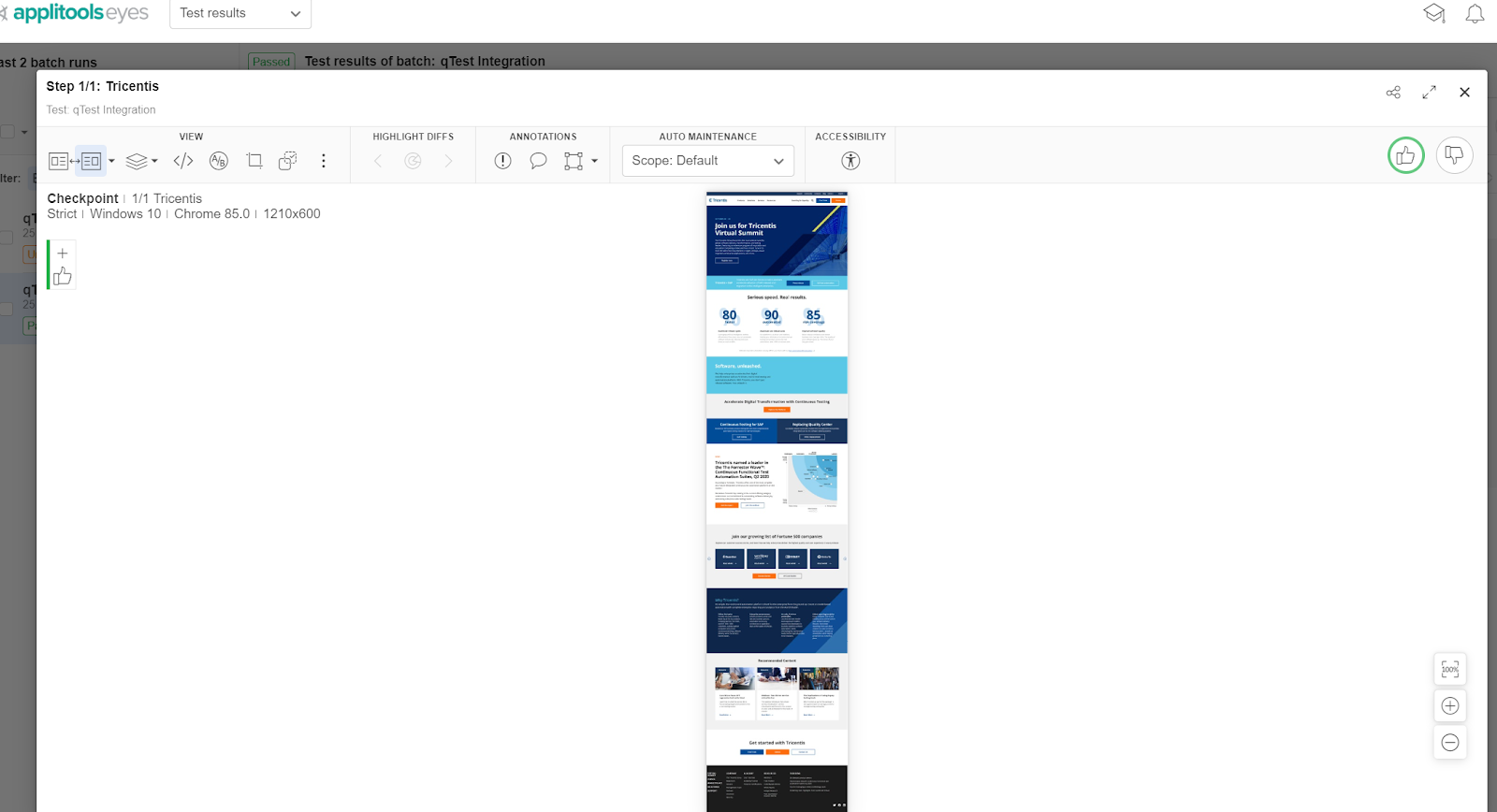
Please refer to Applitools for more details.
So far, we have prepared tests and integrated Applitools and now let’s see the results of integration.
qTest automatically imports automation results to qTest Manager dashboard if tests are executed by qTest Launch. Please refer to qTest Launch for more details.
For execution in Jenkins refer to qTest integrations with Jenkins.
Let’s dive into results imported into qTest Manager as shown below.
Please refer to qTest Manager for more details.
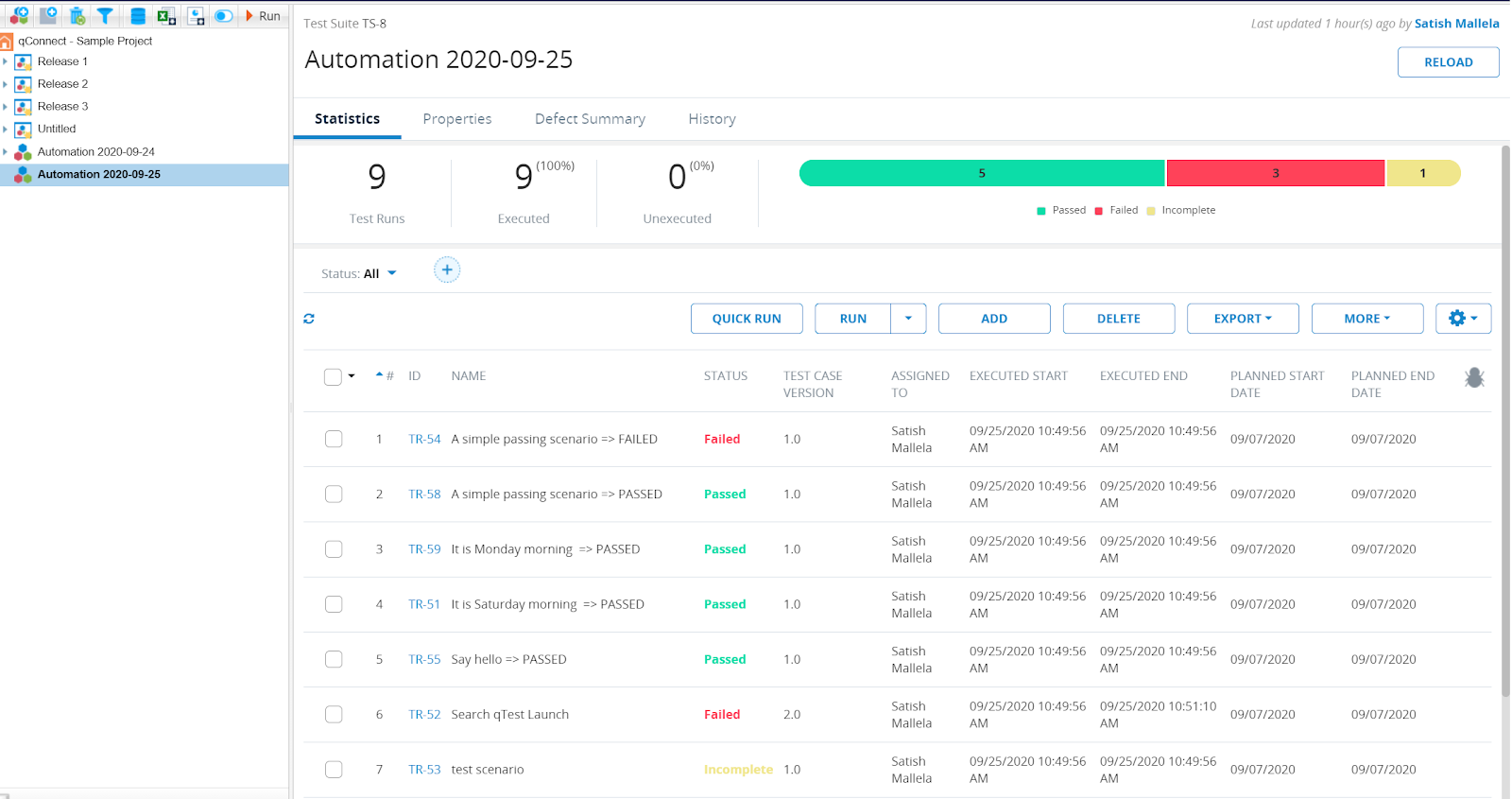
qTest Manager dashboard with automation run results.
As shown in the above screenshot, tests are marked passed or failed.
Integrating qTest with Applitools, the advantage is, qTest marks the test passed or failed depending on the status from Applitools.
Applitools has different status of tests, based on the comparison done by Visual AI.
Please refer to this article for more details.
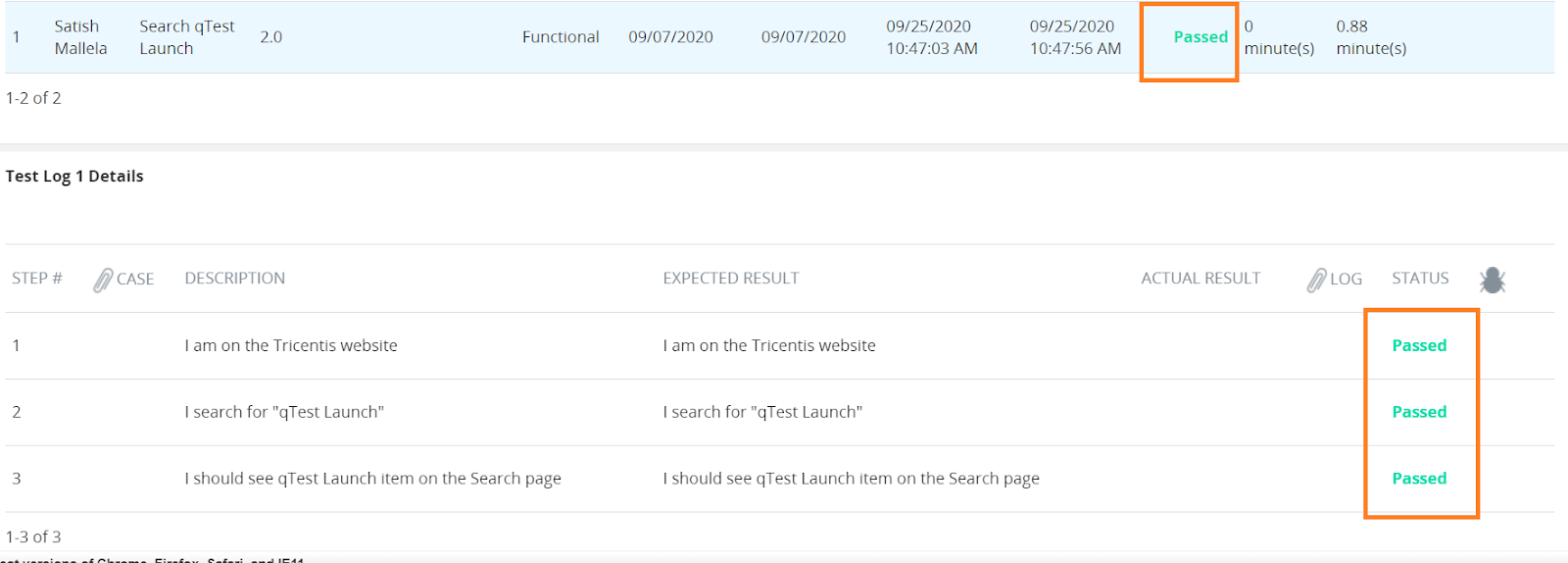
Let’s click on the test executed and see the details of the execution in both pass and failure scenarios,
Passed:
- qTest marks the test as Passed as Applitools have a taken full-page screenshot of the application and no differences observed with baseline snapshot of the same screen.
- Applitools has tested a full-page emulating human eye.
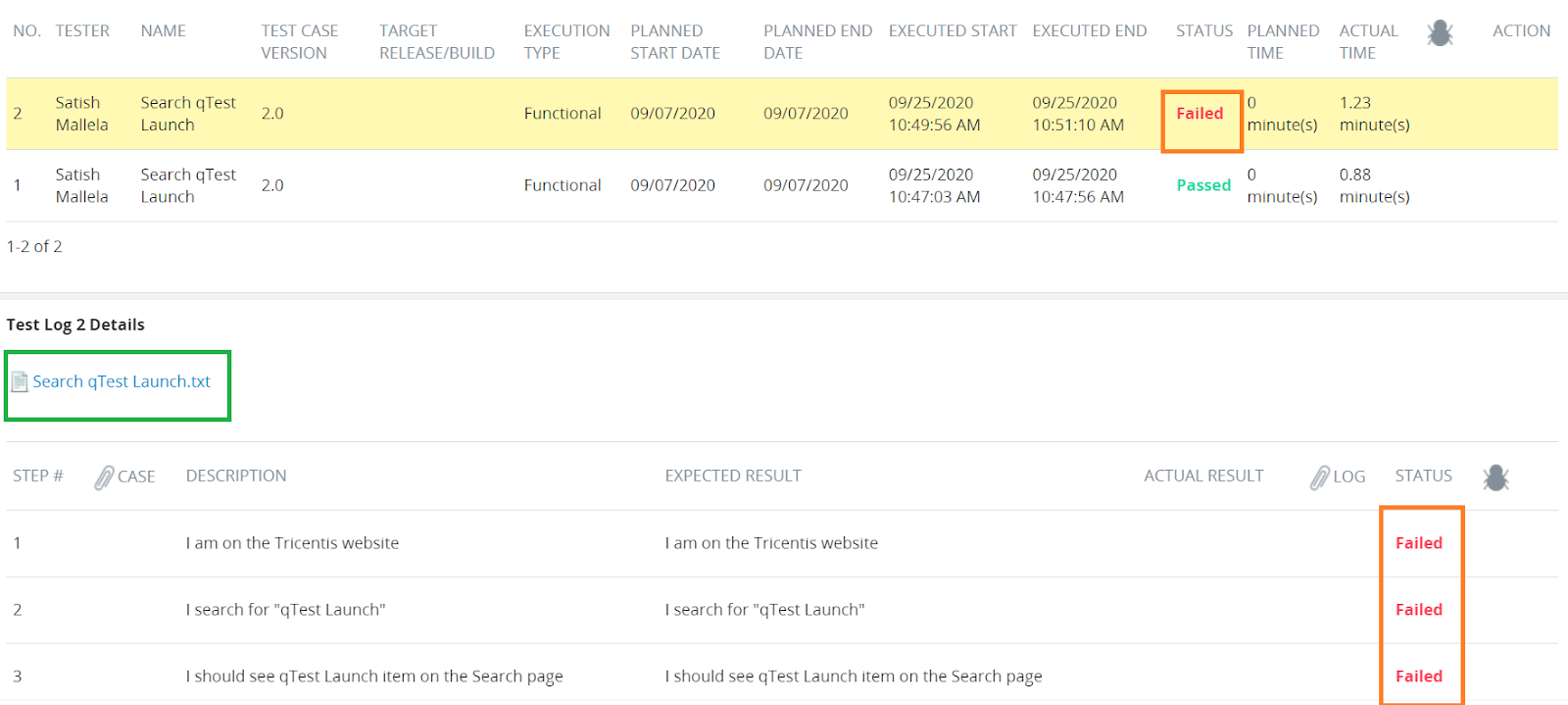
Failed:
- qTest marks the test as Failed as Applitools have taken a full-page screenshot of the application and observed differences with the baseline snapshot of the same screen.
- Applitools has tested a full-page emulating human eye and has found differences that a human eye would visualise by comparing text, images, colour, and contrast.
- To know more about Applitools algorithms comparison and human eye emulation. Follow this link.
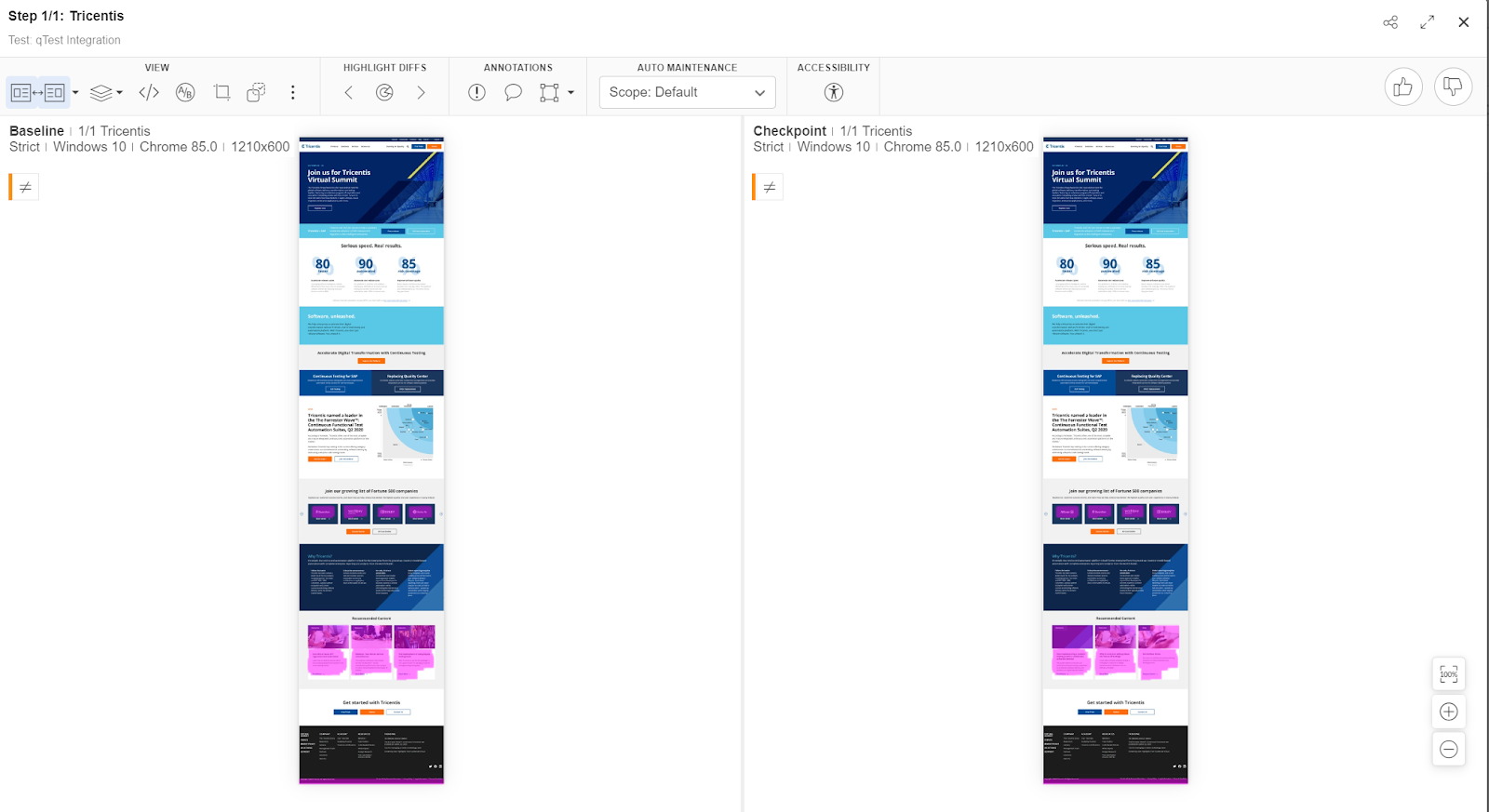
- qTest also provides a link(click the log highlighted in green) to the Applitools Dashboard (sample below) to understand the differences and take action. Follow this link for more details.
“com.applitools.eyes.exceptions.DiffsFoundException: Test ‘qTest Integration’ of ‘qTest’ detected differences! See details at: https://eyes.applitools.com/app/batches/00000251801305860660/00000251801305860535?accountId=<accountID>”
The link sends you to Applitools Test Manager dashboard for users to review results and take actions.
In the below screenshot, Applitools has compared the checkpoint (present application state) with the expected application state(baseline) and if differences found between these two will be highlighted in pink.
To know more about Applitools capabilities for testing websites, mobile applications or PDF documents. Please follow the links.
So far, we have achieved below in agile testing practise with integration,
- Tests are written for user stories
- Automated tests are linked to stories
- Results have been centralised in one place
Now, all the stakeholders, team members should be able to,
- See the progress of given user story testing
- Understand what is been tested in automated testing
- See the current state of application
- Collaborate and take informed decisions
Results are available all time in one place for future reference or auditing purposes, giving agile teams transparency and the ability to trace, measure and increase their efficiency.
Benefits of Integration
In broader terms, Applitools compliments teams using qTest or any other automation tools to,
- Test faster with less code or zero code – productivity gain by 70%
- Cross Browser testing with no infrastructure cost – coverage increase by 90%
- Automation results combined at one place – standardising tools
- Fewer defects to production – bugs caught 45% more with Visual AI
Hope you liked this blog. Keep Testing!