Visual Software Testing is the process of validating the visual aspects of an application’s User Interface (UI). In addition to validating that the UI displays the correct content or data, Visual Testing focuses on validating the Layout and Appearance of each visual element of the UI and of the UI as a whole. Layout correctness means that each visual element of the UI is properly positioned on the screen, that it is of the right shape and size, and that it does not overlap or hide other visual elements. Appearance correctness means that the visual elements are of the correct font, color, or image.
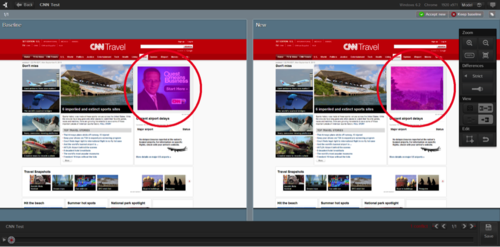
The motivation for performing visual testing has grown dramatically in recent years. Software vendors invest huge amounts of effort, time and money to design and develop beautiful, slick and unique user interfaces in order to stand out from the crowd and meet ever increasing customer expectations. Vendors must verify that their UI correctly displays on an ever-growing variety of web-browsers, screen resolutions, devices, and form-factors, as even the smallest UI corruption can result in loss of business.
Unfortunately, the current state-of-the-art functional test automation tools are ill-suited for automating visual testing. Whether they are Object-based (Selenium, HP UFT, MS Coded UI, and many more) or Image-based (Sikuli, eggPlant, SeeTest, and more), these tools are designed to validate the logic or functionality of applications rather than their appearance. For example, an Object-based tool could run a test in different screen resolutions, successfully clicking buttons or reading text values from UI objects even if they are partially or even completely covered by other UI objects. Similarly, an Image-based tool might be used to validate that a specific text paragraph or image appears correctly on the screen but will fail to identify visual defects in other parts of the UI.
Software vendors are therefore faced with two options for performing visual testing: either test manually or perform ad-hoc visual test automation by building an in-house tool or by abusing a functional testing tool. As many vendors realize, these options are far from satisfactory. Manual testing is extremely slow, expensive and error prone, and can only cover a fraction of the huge testing matrix. Ad-hoc automation, on the other hand, results with a Sisyphean effort to manually maintain a baseline of expected screen images for the various resolutions, browsers and devices that must be constantly updated as the application evolves.
So, what should we expect from a practical visual test automation tool?
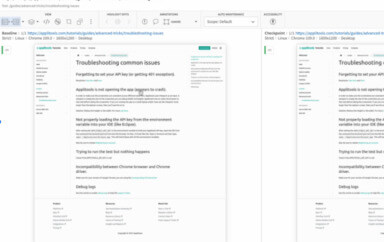
- Cognitive vision: the tool must inspect the application’s UI just like a human does. This means processing entire UI screen images rather than isolated image fragments or opaque UI objects within the application (see Figure 1). Advanced image analysis is required to reduce false defect detection and to pinpoint the root cause of detected changes. For example, the tool should automatically categorize the difference as a content, layout or appearance defect, and pinpoint the specific UI elements that caused the defect. Furthermore, the tool should be smart enough to highlight and resolve each detected change only once – even if it appears in multiple screens of the application.
- Automatic baseline management: the tool should be able to automatically collect and partition expected UI images for each distinct execution environment of the application (browser, device, screen form-factor, etc.). For example, the appearance of an iOS application can be substantially different when running on iPhone vs. an iPad. Changes made to the baseline images (i.e., expected output) of one execution environment should automatically propagate to other baselines of the same test to simplify maintenance.
- Low storage footprint: when detecting a visual bug, both the expected baseline image and the actual image showing the defect must be preserved, preferably along with all the images preceding the detected defect. This information should be associated with a bug entry in an ALM system or a standalone bug-tracker. A practical visual test automation tool must employ extreme image compression techniques to allow this information to exist forever along with the bug entry without resulting with a storage footprint explosion.
- Scale: whether you are a one-man shop or an Enterprise running thousands of tests in parallel, a practical visual testing tool should seamlessly scale to fit your needs.
A practical visual test automation can automatically test the visual aspects of any application on a variety of operating systems, devices, browsers and screen form-factors much faster and more accurately than a human tester would while keeping the analysis and maintenance overhead to a minimum.
If you have experienced the gap in what current software test automation tools can give you today, if the time and effort you need to spend on testing your apps on multi-browser, multi-device and multi-operating systems increases exponentially, or if you find that visual testing is the bottleneck of your Agile development or Continuous Deployment process, it’s time to try out a practical visual test automation tool!
To read more about Applitools’ visual UI testing and Application Visual Management (AVM) solutions, check out the resources section on the Applitools website. To get started with Applitools, request a demo or sign up for a free Applitools account.