If you’ve been following the quality engineering community over the past couple years, you’re probably familiar with Test Automation University (a.k.a TAU). New technologies require new skills — it’s a constant for all of us in today’s world. This is why TAU now boasts over 40 free on-line courses for emerging quality engineering techniques including an Introduction to Cypress by Gil Tayar or Scaling Tests with Docker by Carlos Kidman. And most relevant to this blog are courses on Visual AI including Automated Visual Testing by Angie Jones and Modern Functional Test Automation by Raja Rao DV.


Upskill Yourself — Modernize Your Test Suite
Our main goal in creating a free, open Test Automation University was to help the global test engineering community upskill routinely and have fun doing it. We also recognized the need to help that community understand how and where Applitools Visual AI would fit in. Too often, emerging technologies ask you to rip and replace everything. Not only is that hard to do, but it’s also not realistic. Your team has invested a lot of time and money in their quality management process to date. You’re not going to just throw that all away every one or two years for the latest shiny new tech or trend. Before you make a change, you need to be confident that it will evolve your team from where you are today, yet integrate easily with what is already there.

That’s why we ran the Visual AI Rockstar Hackathon recently. We’re Applitools! Of course we’re going to talk about the wonders of Visual AI. It’s much better, and far more credible, if 288 of your peers in quality engineering do a side-by-side comparison of Visual AI and Selenium, Cypress, or WebdriverIO, then tell you about the wonder of Visual AI themselves. Over the next seven weeks, we will drill into what we learned in a series of blog posts starting this week with test creation time.
Or– if you just can’t wait that long — go ahead and grab the full report here. No better time than the present to learn and upskill for the future.
How Does Visual AI Impact Test Creation Time?
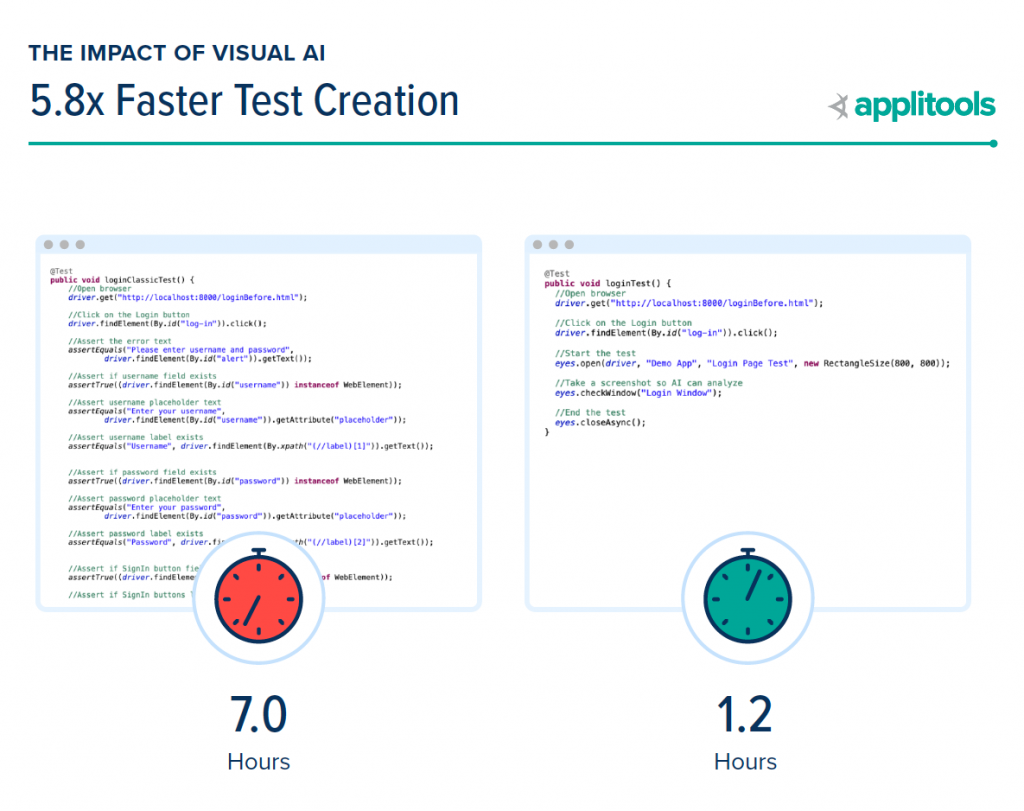
The obvious question — why is it so much faster to author new tests using Visual AI? It’s because Visual AI uses just a single line of code to take a screenshot of the entire page. You’re still automating the browser to click and navigate, but replacing a huge number of code-based assertions with just a simple line of Visual AI code to test for UI elements, form fill functionality, dynamic content, even tables and graphs. With this modern technique, you’re now authoring tests much faster than before and can use the time you save to both test more and test faster.
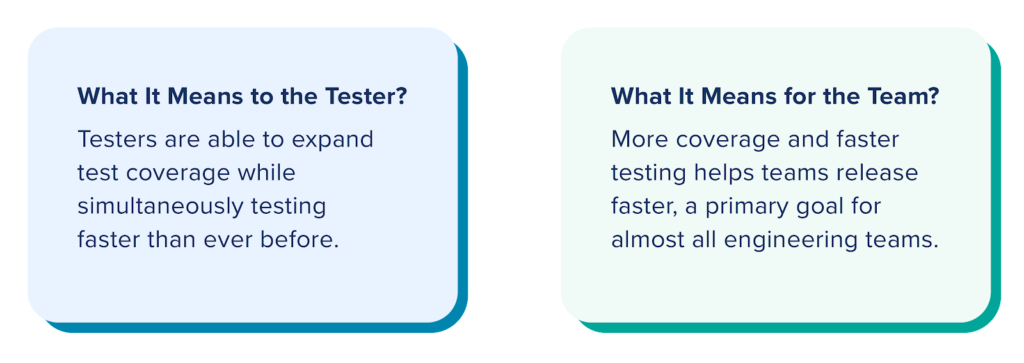
What Differences Did We See Among Quality Engineers?
To help us understand Visual AI’s impact on test automation in more depth, we looked at three groups of quality engineers including:
- All 288 Submitters – This includes any quality engineer that successfully completed the hackathon project. While over 3,000 quality engineers signed-up to participate, this group of 288 people is the foundation for the report and amounted to 3,168 hours, or 80 weeks, or 1.5 years of quality engineering data.
- Top 100 Winners – To gather the data and engage the community, we created the Visual AI Rockstar Hackathon. The top 100 quality engineers who secured the highest point total for their ability to provide test coverage on all use cases and successfully catch potential bugs won over $40,000 in prizes.
- Grand Prize Winners – This group of 10 quality engineers scored the highest representing the gold standard of test automation effort.
By comparing and contrasting these different groups in the report, we learn more about the impact of Visual AI on test creation time.
Looking at the Data
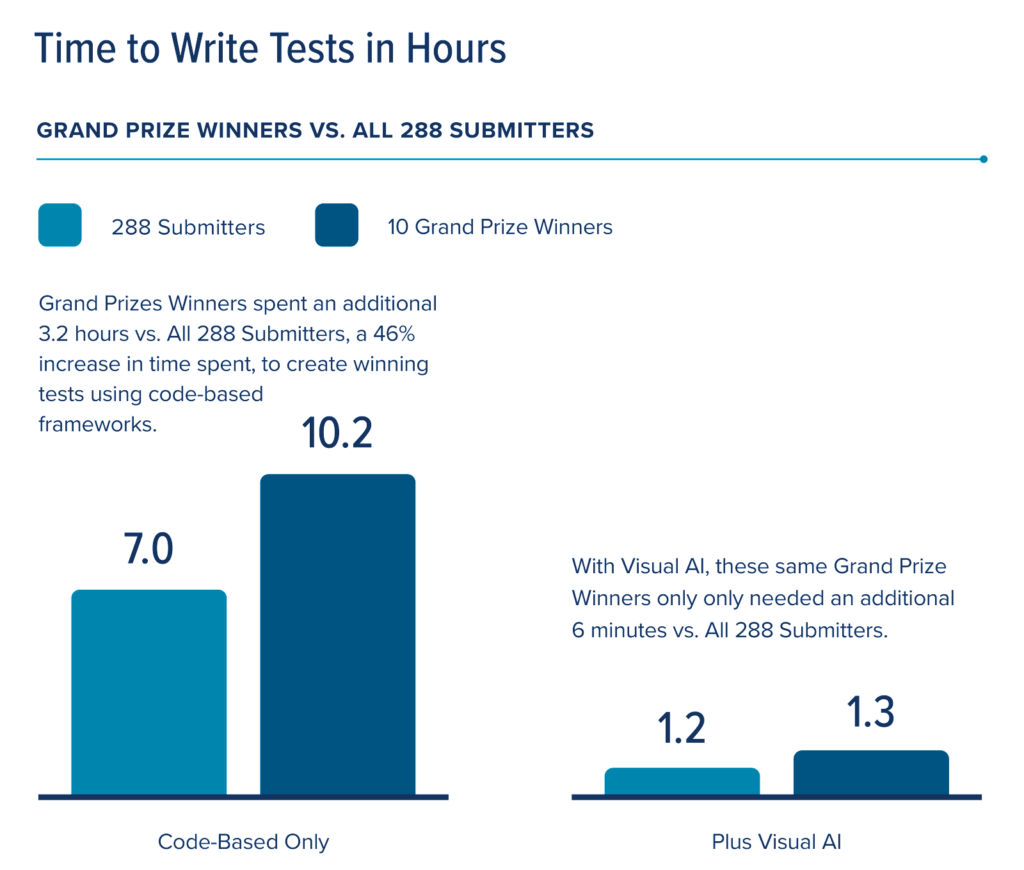
The main point behind this data is subtle, but important. The average test-writer took 7 hours to write conventional code-based assertions that only covered, on average, 65% of potential bugs. How likely will that coverage result in rework?
World-class tests cover 90% or more of potential failure modes. For code-based assertions, the Grand Prize winning submissions achieved, on average 94% coverage. In order to do a “Grand Prize Winning” submission, quality engineers had to increase their test creation time commitment from 7 hours to 10.2 hours. That’s another 3.2 hours of effort to achieve acceptable test coverage!
Contrast code-based coverage with Visual AI results. Using Visual AI, all the testers achieved 95% or more coverage in, on average, 72 minutes of coding. It took the Grand Prize winners only an additional 6 minutes to achieve 100% coverage using Visual AI. This trend continues when you compare the data across all 3 groups like we did here:
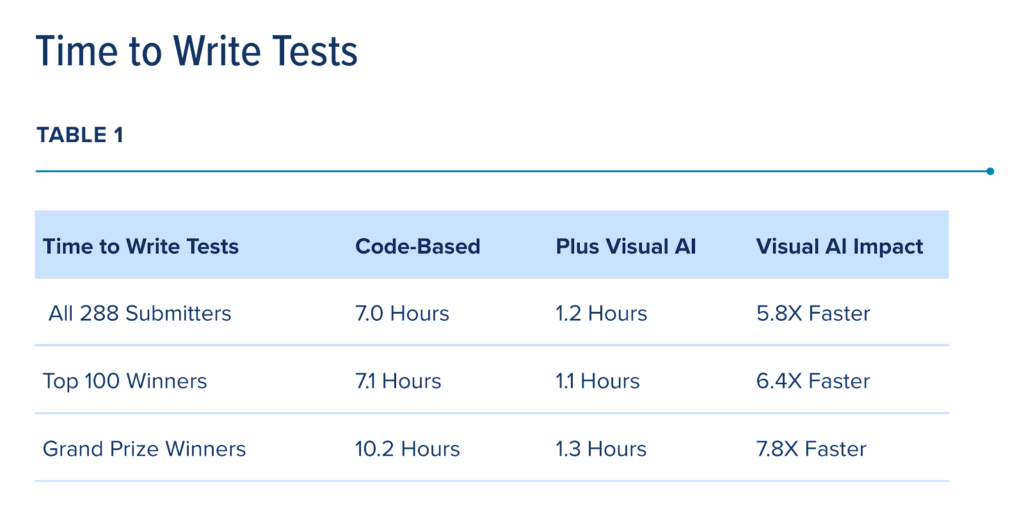
This table shows that using Visual AI speeds up all test code development.
In Conclusion
Conventional wisdom says that you should spend time on being sufficiently productive. So, should you be writing code-based assertions to validate your functional tests? In a real world setting, our data shows that, in contrast with Visual AI, code based assertions slow down releases to ensure that quality engineers provide sufficient coverage. As a practical response, your test team suffers because quality-time tradeoff either makes them a bottleneck or a source of quality concerns.
By including Visual AI in their approach, quality engineers obtain the same amount of coverage 7.8x times faster. Even better, they can use this found time to better manage quality.
Ready to Try It Yourself?
The data we collected from Hackathon participants makes one clear point: no matter your level of coding expertise, using visual AI makes you faster.
Each of the testing use cases in the hackathon – from handling dynamic data to testing table sorts – requires you utilize your best coding skills. We found that even the most diligent engineers encountered challenges as they developed test code for the use cases.
For example, while your peers can easily apply test conditions to filter a search or sort a table, many of them labor to grab data from web element locators, calculate expected responses, and report results accurately when tests fail.
We encourage you to read The Impact of Visual AI on Test Automation. We also encourage you to sign up for a free Applitools account and try out these tests for yourself. But, if you do nothing else, just check out the five cases we researched and ask yourself how frequently you encounter these cases in your own test development. We think you will conclude – just as our test data shows – that Visual AI can help you do your job more easily, more comprehensively, and faster.
Cover Photo by Shahadat Rahman on Unsplash